The dial shows your gear
The game's own gear isn't the one you chose. With Bucky HUD's manual gearbox update, its dials read N, R, 1, 2 and up straight from the gate, even while the engine is stalled.
Bucky scripts · Manual gearbox for FiveM
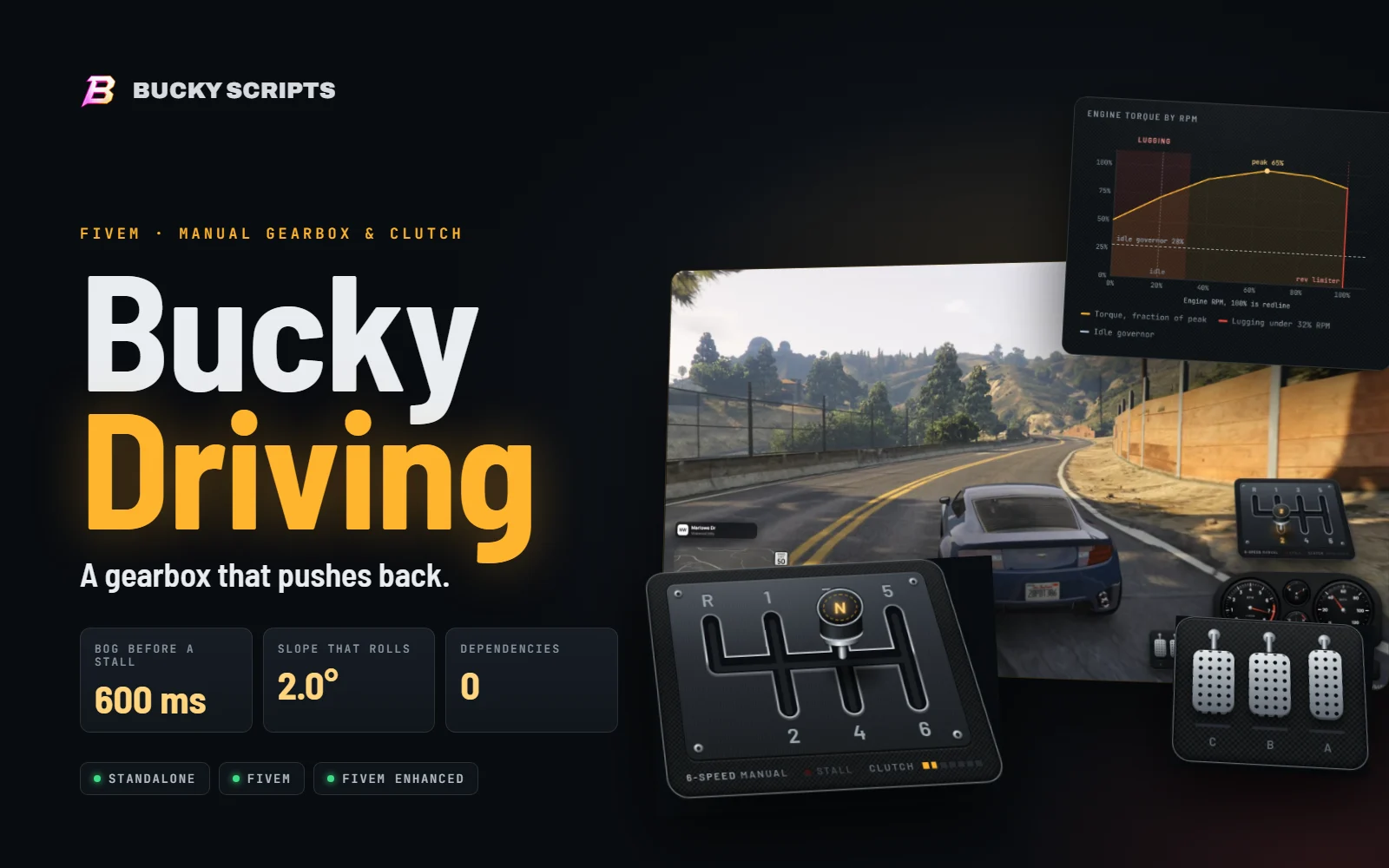
A manual gearbox that behaves like one. Drag the stick through a real H-gate with the mouse, work a clutch that has a bite point, and feel every gear pull differently. Pull away in a gear that is too tall and the engine judders, then dies.
Bucky Driving
Secure checkout by Tebex Instant delivery
§ 1 · Overview
Bucky Driving gives a car a manual gearbox. Every gear has its own ratio, its own pull and its own top speed. The clutch has a bite point. The engine stalls if you pull away in a gear that is too tall, or on a hill without enough throttle.
A tilted H-pattern gate built from your car's gear count. The mouse drags the knob. Gears snap in, and refused shifts knock back.
SEE THE GATE →Hold Left Shift. It goes down in 120 ms and comes up in 900 ms, so the car picks up smoothly through a real bite zone.
SEE THE BITE →An engine torque curve and each car's real gear ratios. Short gears pull hard, tall gears go fast, and every gear hits a rev limiter.
SEE THE CURVE →Too tall a gear, or a hill without throttle, and the engine bogs. Revs sag, the car shudders, then it dies with a clunk.
TRY A LAUNCH →In neutral, or with the clutch in, the car rolls back down a hill from about 2.0° of slope unless you brake.
TILT A HILL →The script drives reverse itself, with idle creep, a reverse top speed, and W and S swapped the way you expect.
SEE REVERSE →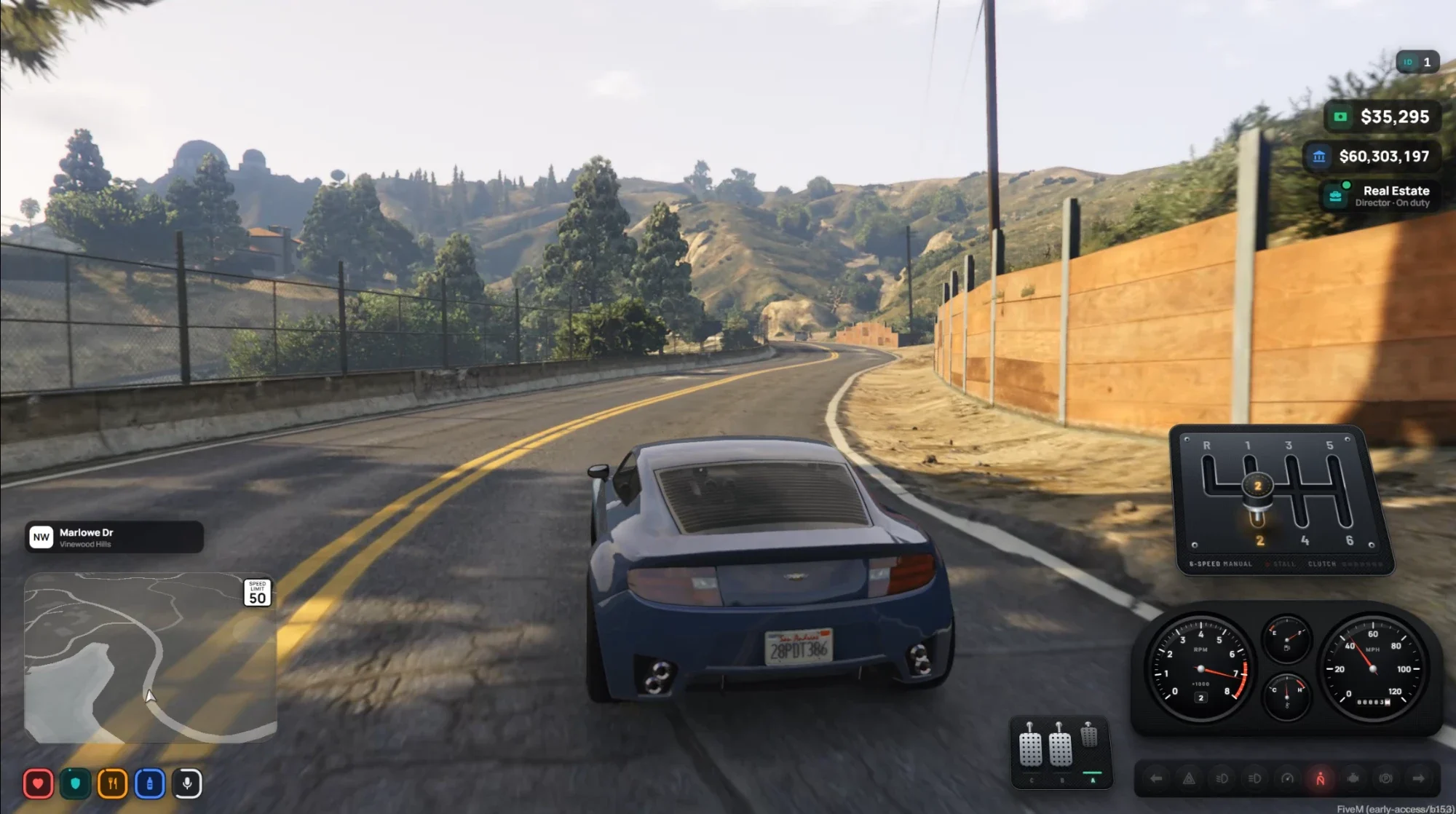
This is a car in second gear on a hill road, on a test server that also runs bucky-hud. Everything the gearbox shows sits at the right of the screen and can be moved with /gearhud.
The stick is in 2nd, so the 2 lights amber and the knob shows the same number. It stays on screen the whole time you drive manual.
Clutch, brake and accelerator. Here only the accelerator is pressed, and its meter is green.
The tachometer shows the gear you selected, not the one the game would pick, and uses the gearbox's own engine revs.
§ 2 · Gear gate
Hold Left Shift. The clutch goes down, the camera freezes, and the mouse starts moving the gear stick. Drag it through an H-pattern gate that is built from the car's own gear count, and let go to drive.
Turn the clutch on, then drag the knob through the gate. Try 1st at 150 km/h, or reverse while moving, to see a refused shift.
The gate is measured in gate units: the stick runs from -1 to 1 sideways, and from -1 (top slot) to 1 (bottom slot) along a column. Every value below lives in Config.Gate.
| Setting | Value | Zone on the drawing |
|---|---|---|
| neutralZone | 0.3 | Amber band along the rail. |
| capture | 0.45 | Circles round each column on the rail. |
| railDetent / railDrag | 0.25 / 0.4 | Inner circles where the stick slows. |
| snapIn | 0.45 | Green tick: the stick drops into gear. |
| popOut | 0.7 | Blue tick: pulled back past it, the stick pops to neutral. |
| engage | 0.85 | Slot end zone where the gear counts as engaged. |
| blocked | 0.6 | Red tick: where a refused gear stops the stick. |
The gate is drawn from the number of gears the car has. Reverse moves to keep the pattern balanced.
The gearbox can turn a gear down. The knob stops at 60% of the way into the slot, the numeral flashes red, the knob shakes, and a short grind plays. Nothing engages until you back off.
| Reason | When it happens |
|---|---|
| overrev | A downshift would spin the engine past 115% of redline. Selecting 1st at 150 km/h does this. |
| moving | Reverse above 1.5 m/s, or a forward gear while rolling backwards faster than that. |
| clutch | The clutch is not down far enough. In the game the stick simply does not move until it is, so you will mostly meet this in the demo. |
Neutral is always allowed, at any speed.
A carbon-fibre surround with a chrome trim, tilted back in CSS 3D like a real centre console.
Chrome-rimmed slots with etched numerals. The engaged gear lights amber, and reverse lights red.
Leather with amber stitching. It stands upright on the plate and shows the current gear.
Lights red when the engine has stalled.
Segments fill as the pedal goes down.
§ 3 · Clutch
Left Shift is the pedal. It goes down fast and comes up slowly, and the drive builds through a bite zone in the middle of its travel. Let it out gently and the car eases away. Dump it and the engine has to cope.
Press a button to play a clutch movement. The cursor shows pedal travel and drive as time passes.
The pedal is a hold, not a toggle. Press it, pick the gear, and let go the way you would in a real car: smoothly, with a little throttle.
§ 4 · Torque and gearing
When the game can report a car's gear ratios, Bucky Driving reads them, holds the game's gearbox in a single gear, and gives that gear the ratio of the gear you picked. Revs, engine sound, pull and top speed then follow the gate.
Each bar runs from idle to redline in that gear. Short gears cover a narrow range at low speed. Tall gears cover a wide range up to the car's top speed, and the bars overlap so you always have a gear that suits the speed.
A car's own ratios are used when the game reports them. If a build cannot, the gearbox spreads ratios as (gears / gear) ^ 0.8, which is what the chart draws. Real cars will differ a little.
Some FiveM builds do not expose every native that ratio mode needs. The script checks for them and, if any is missing, switches itself to scale mode: the game keeps its own gears and the script scales its power to match. /geardebug shows which mode you are in.
Reverse takes the reverse ratio the game reports. With the fallback spread it tops out at 80% of 1st gear's top speed.
If the script only told the game which gear to be in, the game's own automatic gearbox would keep changing its mind. A car in 7th could pull like 4th while the HUD showed 4th. Ratio mode removes the argument: the game only has one gear to choose from.
The script sets a gear number, the game's automatic gearbox overrules it, and the gear that reaches the wheels is not the one you chose.
The game's gearbox is set to one gear. That gear carries the selected gear's ratio, so nothing can change it. The car's own gearbox comes back when you get out, run /manual to switch off, or stop the resource.
Grip, wheelspin, weight transfer and the suspension stay with the game. The gearbox decides how much drive goes in, the game decides what the tyres do with it.
§ 5 · Pulling away and stalling
Moving a car off from rest takes torque. A short gear multiplies the engine's torque, a tall gear barely does. Pick a gear the engine cannot carry, let the clutch out, and it bogs, then stalls. Pick 1st on flat ground and it just rolls away at idle.
Click any square to load it into the launch lab. Built-in ratio spread; a real car uses its own ratios and will land close to these.
The engine can carry the car away when the torque it can offer is at least the load it has to move.
1st creeps away on the flat with no throttle. 2nd needs about 6% throttle. 3rd needs about 62%. From 4th gear up the engine cannot pull away from rest at all. On a 10° hill, 1st needs about 33% throttle.
When the engine cannot carry the load it does not die at once. For 600 ms it bogs, and you get a warning you can act on.
During the bog, three things stop it: press the clutch, add throttle so the engine can offer enough torque, or let the car reach idle speed for that gear. The bog timer resets straight away.
Press J with the clutch in or the stick in neutral. J only restarts an engine that Bucky Driving stalled. A car switched off any other way is left to your vehicle keys script.
In gear with the clutch out, under 32% RPM and with the throttle down, the whole car vibrates as the engine labours. Change down and it stops.
§ 6 · Hills and rollback
In neutral, or with the clutch in, a car on a slope rolls the way a real one does. It needs about 2.0° of slope to start, steeper hills roll faster, and the brake or the handbrake holds it.
| Slope | Acceleration | After 5 s from rest |
|---|
Straight from Config.Rollback. The script sets the car's speed every frame because the game holds a stopped car in place by itself.
§ 7 · Reverse
Reverse only engages when the car is nearly stopped. Once it is in, W drives you backwards and S brakes. Let the clutch out with no pedals pressed and the car creeps back at idle. The script drives reverse itself, so the pedals behave the same way every time.
Reverse is selected. Let the clutch out slowly, then try W and S.
§ 8 · Pedals and layout
Clutch, brake and accelerator sit under the gate and tip on their hinges as you press them. /gearhud lets each player drag the gate and the pedals anywhere and resize them. The layout is saved on the player's own PC.
The clutch takes 120 ms to go down and 900 ms to come up, exactly as in the car. Brake and accelerator follow the key.
Turn the pedals off with /pedals, or for everyone with Config.Pedals.enabled = false.
/gearhud, the layout editorType /gearhud in game and the cursor appears. The two panels get a dashed outline and a small bar. This is the same editor on a mock 1080p screen, drawn to scale. Drag the panels, try the mouse wheel over one, and use the toolbar.
/pedals.Config.Display says.Position is the centre of each panel in % of the screen, and size is 1 = 100% at 1080p. Both grow with screen height. The layout is saved on the player's own PC, and everything is checked and clamped in Lua before it is stored.
§ 9 · Sound
Every sound is made in the page from filtered noise and short pitched thumps. There are no audio files to ship, no licences to check, and each sound lasts between 20 and 600 milliseconds. Press play to hear them, and watch the waveform.
Config.Sounds = {
    enabled = true,
    volume  = 0.5, -- master, 0..1
    shift   = 1, -- gear in / out / refused, relative to master
    pedals  = 0.7, -- pedal press / release, relative to master
}
Players turn the sounds off for themselves with /drivesounds.
§ 10 · Works with
Bucky Driving needs nothing else. It checks for its partners with GetResourceState, calls them inside pcall, and carries on without them when they are missing.
The game's own gear is not the gear you chose, so a speedometer that asks the game shows the wrong number. With bucky-hud's manual gearbox support installed, its dials read the gear from Bucky Driving instead.
The bucky-hud side is a separate update in bucky-hud's own resource. Install it there and restart both scripts. Enter the car again so both pick up the new state.
One client export gives any script the gearbox state. It returns nil when the player is not driving manual.
local ok, st = pcall(function()
    return exports['bucky-driving']:GetGearState()
end)

if ok and type(st) == 'table' then
    -- st.gear    'N', 'R', or the gear number
    -- st.gears   how many forward gears the car has
    -- st.clutch  pedal travel, 0 up .. 1 down
    -- st.rpm     engine revs, 0 .. 1 (1 = redline)
    -- st.stalled true while the engine is stalled
end
| Script | What to expect |
|---|---|
| qb-smallresources cruise control | Cruise holds speed by setting the car's speed directly, which fights the gearbox. Turning it on while driving manual shows a notice. |
| qb-smallresources pushing | Pushing a car is unaffected. |
| qb-mechanicjob nitrous | Nitrous and the gearbox both use the game's engine power multiplier. While a manual car is driven the gearbox sets it every frame, so nitrous may have no effect in it. |
| Vehicle keys | J only restarts an engine that Bucky Driving stalled. A car switched off any other way is left to your keys script. |
| qb-core, oxmysql | Not used. No server script, no database, no events. |
§ 11 · Controls and commands
The whole gearbox is worked with one held key and the mouse. Everything else is the game's own controls. Press the keys on your keyboard and the caps below press with them.
| Command | What it does |
|---|---|
| /manual | Turns the manual gearbox on or off for you. The choice is saved. New players start with it on. |
| /gearhud | Opens the layout editor for the gear gate and the pedals. |
| /pedals | Shows or hides the pedal display. |
| /gearsens 0.2 to 5 | How fast the mouse moves the stick. Without a number it tells you the current value. The default is 1. |
| /drivesounds | Turns the gearbox sounds on or off. |
| /geardebug | Shows live numbers on screen: mode, your gear against the game's, speed, RPM, power, clutch and load. Handy when tuning. |
Keys can be rebound in Settings → Key Bindings → FiveM. Everything a player chooses is saved on their own PC.
Get in as the driver. The gate appears on the right, in neutral. Cars with one gear, EVs, boats, aircraft, cycles and trains are left alone.
Hold Left Shift and move the mouse. Up and left is 1st. The knob snaps in.
Add a little throttle and let Shift go slowly. Over about a second, the car picks up. On the flat, 1st will even creep by itself.
Shift up as the revs climb. Hold Shift, pull the stick down to 2nd, and let go. The gate will refuse a gear that would over-rev the engine.
To stop, brake, hold Shift and select neutral. If you forget, the car stalls in gear.
If it stalls, hold Shift and press J.
§ 12 · Installation
There are no dependencies, no database and no server script. It works on FiveM and on FiveM for GTA V Enhanced.
Put the bucky-driving folder in your resources, for example in [bucky-scripts]. Leave tests/ and docs/ out of a packaged copy.
Add the line to your server.cfg. Start it after bucky-hud if you use it, so the dials find it, though the order does not matter once both are running.
Restart the server, or run ensure bucky-driving from the console. Get into a car as the driver. The gate appears.
Everything lives in config.lua. Change a value and restart the resource. See the configuration chapter.
# optional partner
ensure bucky-hud
ensure bucky-driving
fx_version 'cerulean'
game 'gta5'
lua54 'yes'
author 'Bucky'
ui_page 'html/index.html'
nui_callback_strict_mode 'true'
| Needs | |
|---|---|
| Game | FiveM, or FiveM for GTA V Enhanced. Enhanced only reads fxmanifest.lua, and this resource ships nothing in a stream folder. |
| Framework | None. It works on QBCore servers and on servers with no framework. |
| Database | None. |
| Server load | None. There is no server script. |
§ 13 · Configuration
This table is read from config.lua when the page is built, so the defaults here are the defaults in the file. Type to filter.
§ 14 · How realistic is it
Bucky Driving is a gearbox and an engine, not a full vehicle simulator. It models the parts a driver's hands and feet feel. The game keeps doing what it already does well: tyres, suspension, weight and collisions.
Measure it on your own server with the resource monitor (resmon 1), with and without the resource running.
The gate and pedals are built to stay light inside FiveM's built-in browser.
transform, opacity and clip-path change over time. No animated filters and no backdrop filters.§ 15 · Troubleshooting
No, that is what a real car does. 4th is far too tall to pull a stopped car away. With the clutch held in the engine runs but the car stays still. Let it out and the engine bogs, judders and stalls within about 600 ms. Try 1st, which creeps away on its own, or 2nd with a little throttle. The launch matrix in the stalling chapter shows what each gear needs.
The dial must come from Bucky Driving, not from the game. Make sure bucky-hud has the manual gearbox update, restart both resources and get back into the car. To check the export by hand, run exports['bucky-driving']:GetGearState() from any client script while driving. It should return the gear, or nil if you are not driving manual.
Turn on /geardebug and watch power and gear top. Config.Engine.power scales the whole engine, torqueCurve shapes it, and the ratios come from the car itself. Raise or lower power in steps of 0.1 and restart the resource.
Each player can set it with /gearsens, from 0.2 to 5. To change the default for everyone, edit Config.Gate.sensitivity.
The camera is frozen with the game's look controls while the clutch is held. If another script re-enables them every frame, it may win. Check for scripts that call EnableControlAction on look controls each tick.
Run /gearhud, drag it where you want it, and press Enter. To change where it starts for everyone, edit Config.Display.
J only restarts an engine that Bucky Driving stalled, and only with the clutch in or the stick in neutral. A car switched off any other way is started by your vehicle keys script.
Nitrous and the gearbox both use the game's engine power multiplier. While you drive a manual car the gearbox sets it every frame, so it wins. Switch to automatic with /manual, or exclude the model in Config.ExcludedModels.
/geardebug says mode "scale".Ratio mode needs a few game natives that not every FiveM build exposes. If any is missing, the script drops to scale mode: the game keeps its own gears and the script scales its power to match. It works, but revs and sound follow the game's gear more than yours. You can also force scale mode with Config.Drive.mode = 'scale'.
Add the model name to Config.ExcludedModels, or the class to Config.ExcludedClasses. Cycles, boats, helicopters, planes and trains are already excluded, and so are cars the game reports as electric. Any player can also switch to automatic for themselves with /manual.
No. Cruise holds speed by setting the car's speed directly, which fights the gearbox. Turning it on while you drive manual shows a notice.
Check that /drivesounds has not turned them off, and that Config.Sounds.enabled is true and the volume is above zero.
No. There is no server script. The manual switch, pedals switch, mouse speed, sounds switch and layout are saved on each player's own PC.
Bucky Driving needs nothing else: no framework, no database. Installed next to Bucky HUD, the dials show the gear you chose, not the one the game picked.
The game's own gear isn't the one you chose. With Bucky HUD's manual gearbox update, its dials read N, R, 1, 2 and up straight from the gate, even while the engine is stalled.
The tachometer follows the gearbox's own engine revs, so the needle drops during a bog and matches the gear you're in.
Notices like "Stalled" go through Bucky HUD when it's running, and through the GTA feed when it isn't. Without Bucky HUD, nothing breaks.
Supply chain. Farms, warehouses and kitchens linked by player-driven trucks and trains. When the chain stops, businesses run dry.
A manual gearbox for FiveM that behaves like one. Drag the stick through a real H-gate with the mouse, work a clutch with a bite point, and feel every gear pull differently. Pull away in a gear that is too tall and the engine judders, then stalls.
No. It has no framework, no database and no server script. It works on QBCore servers and on servers with no framework at all.
Yes. Any player can switch between manual and automatic with /manual, and the choice is saved. You can also keep certain models or vehicle classes automatic for everyone in config.lua.
Yes. With Bucky HUD's manual gearbox update, its dials show the gear you selected in the gate and the gearbox's own engine revs, even while stalled. Without Bucky HUD, the gate shows the gear itself.
Yes. It runs on both the classic FiveM build and FiveM Enhanced (the GTA V Enhanced edition of the platform).
After checkout the resource is added to the Cfx.re Keymaster account you signed in with. Download it from Keymaster and add it to your server like any other resource.
The core is protected with Cfx.re Asset Escrow, so it can't be leaked or resold. The config files you need to tune it stay open and editable.